USM Content
Smart Assist requires a Pro, Business, Enterprise, or Advanced Work Management plan.
MCP-enabled AI assistants require a Business, Enterprise, or Advanced Work Management plan.
Both Smart Assist and MCP-enabled AI assistants use the Smartsheet MCP Server to access your Smartsheet data, with your consent.
MCP stands for Model Context Protocol. MCP is an open standard that enables AI systems to safely connect to external data sources.
The following sections explain what you can do with Smartsheet in conversation with Smart Assist and MCP-enabled AI assistants, demonstrate conversing with them, and provide resources to start your own conversations.

What can I do in conversation with Smart Assist?
Smart Assist is an AI assistant embedded in the Smartsheet application. Smart Assist understands your current context and is ready to answer questions and perform requested actions.
In Smart Assist, the following prompts use your current sheet context:
- "What is this sheet about?"
- "What projects are behind schedule?"
- "Which team members have capacity this week?"
You can also query and act on Smartsheet data outside of your current context.
Additionally, you can upload files directly to Smart Assist for analysis and to execute approved actions on your sheets.
Smart Assist uses the Smartsheet MCP Server for all requests.
What can I do in conversation with an MCP-enabled AI assistant?
The Smartsheet MCP Server is also available to use with MCP-enabled AI assistants, such as ChatGPT, Claude, Gemini Enterprise Plus, Microsoft 365 Copilot, and more. After you connect an AI assistant to the Smartsheet MCP Server, you can interact with your Smartsheet data conversationally in that assistant. An AI assistant connected to the Smartsheet MCP Server allows you to leverage the AI assistants features, such as deep research, workflow development, or the ability to specify additional context and instructions via skills.
Various AI assistants connected to the Smartsheet MCP Server support the following actions:
- Act on your Smartsheet data in chat
- Interact with your integration code using a command line interface (CLI)
- Read from and write to local files that you specify
- Create specialized agents with skills
- Conduct comprehensive research
What are some Smartsheet-related conversational use cases and example prompts?
You can ask questions or give instructions using everyday language. The Smartsheet MCP Server reads live Smartsheet data you have access to and responds with summaries, insights, or actions based on your request.
Here are some common use cases and example prompts:
Onboard to projects
The following prompts summarize sheets and workspaces, and provide orientation.
- "What is sheet X about?"
- "What projects are in workspace Y?"
- "What are valid status values in the Z sheet?"
Build and structure
The following prompts can help you create and modify sheet structures:
- "Create a new project tracker with standard PM columns."
- "Add a Priority column with High/Medium/Low options."
Generate summaries
The following prompts demonstrate cross-project reporting and report analysis:
- "Pull the cross-project status report and show me everything overdue."
- "Use the resource report to find who's overloaded."
Identify risks
Prompts, like the ones below, surface potential issues before they become blockers.
- "What's about to slip in the next two weeks?"
- "Which projects have more than three items marked Blocked?"
Support decision-making
The following prompts analyze patterns and summarize trade-offs across your data.
- "Based on my Vendor Evaluation sheet, which vendor scores highest overall? Summarize the trade-offs."
- "Do we have the capacity to take on Project X? Show workloads."
Maintain data quality
The following prompts help identify gaps, inconsistencies, and structural issues in sheets.
- "Find rows missing these required fields: Owner, Due Date, or Priority"
- "Identify any duplicate task names in my Master Task List?"
Participate in discussions
The following prompts summarize discussions and open discussions to gather status.
- "What are people saying about the launch tasks? Summarize the key points."
- "Start a discussion on each overdue row, asking the owner for a status update."
These are just a few of the types of questions and instructions you and your team can use in your AI environments.
The Smartsheet prompt cookbook provides over 100 prompts to help you get started and describes best practices to sequence actions.
How do I start a conversation with Smart Assist or an MCP-enabled AI assistant?
To start working with Smartsheet in conversations with AI, follow the steps specific to your preferred AI assistant:
To use Smart Assist, visit Home.
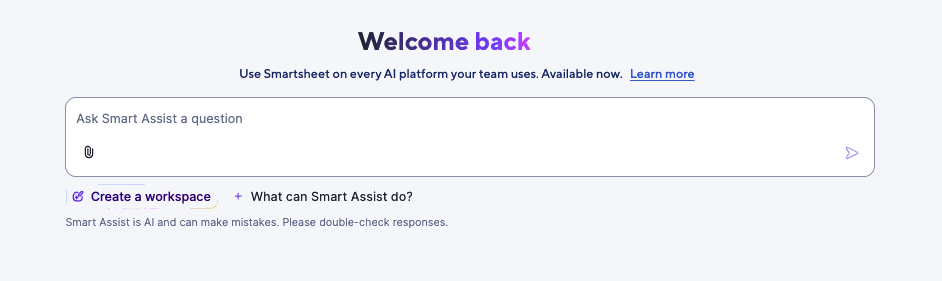
Alternatively, open a sheet (in Table, Gantt, Board, or Timeline view) or a report (in Timeline view), and select the AI sparkle icon located at the top-right corner of your screen. Smart Assist appears alongside your sheet or report.Brandfolder Image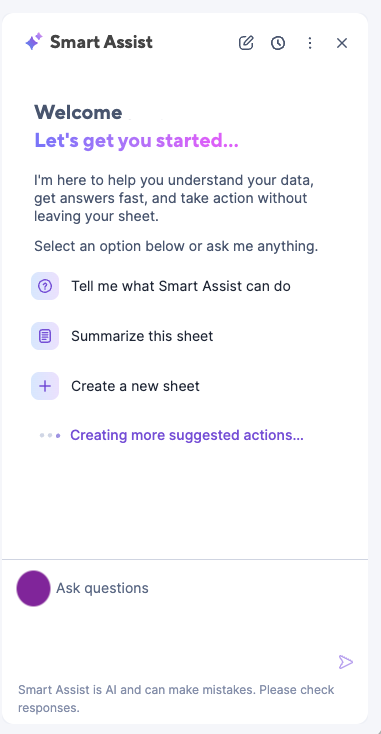
Ask a question, import a data file, or enter an action to perform, and select Send.
Toggle between using Smart Assist in full-screen and in the side panel by selecting the expand icon
 and collapse icon
 respectively.
 - To use an AI assistant, go to the instructions for connecting your specific AI assistant to the Smartsheet MCP Server.
Check out Smartsheet MCP prompt library for lots of example prompts.