How you cancel your Smartsheet account depends on your plan type and how you pay for that account.
USM Content
What should you confirm before canceling?
Before you cancel, keep these points in mind:
- Submit your cancellation request at least 30 days before your renewal date.
- Canceled accounts don't qualify for pro-rated or full refunds. See the Smartsheet User Agreement for cancellation terms.
- If you cancel a plan type that is no longer available for purchase from Smartsheet (a Team or Advanced plan, for example), you can't re-purchase that plan type later.
What happens when you cancel?
Canceling your account has these effects:
- Your Smartsheet items become read-only immediately, then are permanently deleted 30 days after cancellation
- Items others shared with you remain accessible
- You can't create new Smartsheet files
- You can't repurchase a deprecated plan type (Team or Advanced, for example) after cancellation
How do you save your sheets?
If you want to keep access to your sheets or their data, do one of the following before you cancel:
- Transfer sheet ownership so others can continue using the sheets.
- Export your sheet data to use it in another program, such as Microsoft Excel or Google Sheets.
Make a list of critical sheets you own and decide what to do with each.
Can't sign in to Smartsheet?
If you're unable to sign in to your Smartsheet account, you can't complete the self-service steps below. Check these possibilities:
- Your account is deactivated: A System Admin can deactivate user accounts in Smartsheet. Contact your current or previous System Admin to request reactivation. See Deactivate or reactivate users for more information about what deactivation means and how it works.
- You're experiencing a sign-in issue: See Troubleshoot sign-in issues to regain access to your account.
If you still can't access your account, contact the billing support team to request cancellation.
Which cancellation path applies to you?
Use this table to find the steps for your situation:
Your situation | Who can cancel | Steps |
|---|---|---|
Mobile app (free or trial accounts only) | Account admin | |
Pro or Business plan | Account owner (Pro) or System Admin (Business) | |
Enterprise plan | Contact Smartsheet Support | |
Trial or free account | Account admin | |
Invoice billing (annual or custom) | Account admin |
Cancel from the mobile app
You must be the administrator of a trial or free account to cancel from the mobile app.
- Open the Smartsheet mobile app.
- Select your profile picture in the upper left corner of the home screen.
- Select Settings.
- Select Cancel Account.
- Select Cancel Account again to confirm.
You're redirected to the sign-in screen. Cancellation takes effect immediately.
Cancel an invoice-billed account
This process is available only to account admins with annual or custom billing.
If you purchased your plan through Smartsheet's sales team and pay by invoice, submit a cancellation request:
- Go to the invoice account cancellation request form.
- In the Please select the type of downgrade list, select Cancel subscription. These are the other available options:
- Downgrade to a different plan type
- Remove licenses
- Discontinue an add-on or other product
- Enter your desired cancellation date. It must be at least 30 days before your renewal date.
- Submit the form.
The billing team reviews your request, typically within two or three business days, and confirms your cancellation date.
If you have other billing concerns, visit the Customer Support Center or contact Billing Support.
Cancel a Pro or Business plan
Only the System Admin can cancel Pro or Business plans. You can choose to cancel immediately or at the end of your billing cycle.
When you select Cancel and accept data loss, Smartsheet permanently deletes your sheets and data 30 days after your cancellation date. Export or transfer your work before you continue.
- Sign in to your account through https://app.smartsheet.com/b/home.
On the left navigation bar, select Account > Plan & Billing Info.
The Account Administration window displays.
- In the Plan & Billing tab, select Cancel Account.
In the dialog that appears, select Continue to cancellation.
Brandfolder Image
Before you proceed, Smartsheet offers two optional resources: See video guides and Ask the Community. You can choose to review these or skip straight to confirming your cancellation.
- Review the confirmation page. It shows what happens to your account after cancellation:
- Cancellation effective date: The date your plan ends
- Work becomes read-only: You and your team lose all editing and collaborating access
- Permanent deletion: All your data gets permanently deleted 30 days after the effective date (you can’t recover it)
Select Cancel and accept data loss to proceed, or select Keep my plan active to stop the cancellation.
Brandfolder Image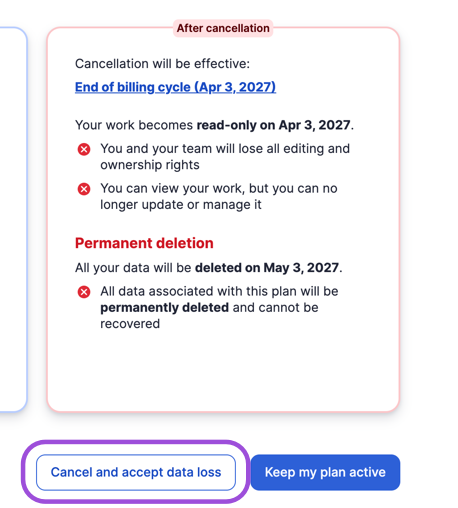
- After you confirm, you return to the Account Administration window. Select Delete Account to close your account immediately, rather than waiting until the end of your plan term.
Cancel a trial account
This process is available only to administrators of a trial or free account.
You can cancel Trial and free accounts at any time. You have two options for canceling:
- On the left navigation bar, select Account > Plan & Billing Info.
- In the Plan & Billing Info tab, select Cancel Account.
- In the Cancel Account window, choose one of these two options:
- Switch to Free: Your account stays active and you can keep signing in. Sheets shared with you remain accessible. After 30 days, sheets you own become read-only and move to the Deleted Items folder.
- Deactivate Account: Your account closes immediately. Sheets you own are deactivated right away, and users can't sign in.
Cancel an Enterprise plan
To cancel an Enterprise plan, contact Smartsheet Support.
Enterprise plans have custom billing cycles and contract terms, so you can't cancel them in the app. To cancel, use one of these options:
- Contact your Smartsheet sales representative directly.
- Contact the Account and Billing team.
Deactivate an Enterprise account
Deactivation is a temporary account hold, available only after you've set your account for cancellation during renewal. It isn't the same as canceling your account, and it isn't available for Pro or Business plans.
- On the left navigation bar, select Account > Plan & Billing Info.
- To open the Cancel Account dialog, select Cancel Account.
- To confirm the cancellation, select Deactivate Account, and then select OK.
If you reset your sign-in or resubscribe before Smartsheet removes your sheets, you can recover them from the Deleted Items folder.
Undoing a cancellation
If you canceled your account but your subscription hasn't ended yet, contact Smartsheet Support immediately. You might be able to reactivate your account. If your account already closed, you need to purchase a new plan.
Recover deleted items
Read the Delete Smartsheet items help article to learn how to recover deleted items.