Integrate your work environment and your conversation environment with Smartsheet for Slack.
USM Content
Smartsheet for Slack Integration has the following capabilities:
- Send notifications from Smartsheet to a public or private channel.
- Grant or request permissions when sharing Smartsheet items in Slack.
Smartsheet for Teams is compatible with the desktop and mobile versions of the Slack application.
Installation requirements
- Installation must be done from the Slack desktop app.
- If you use Smartsheet Regions Europe, your Slack administrator must approve the integration.
Installation
- Open the Slack desktop app.
- In the left panel, select Apps > Manage > Browse Apps.
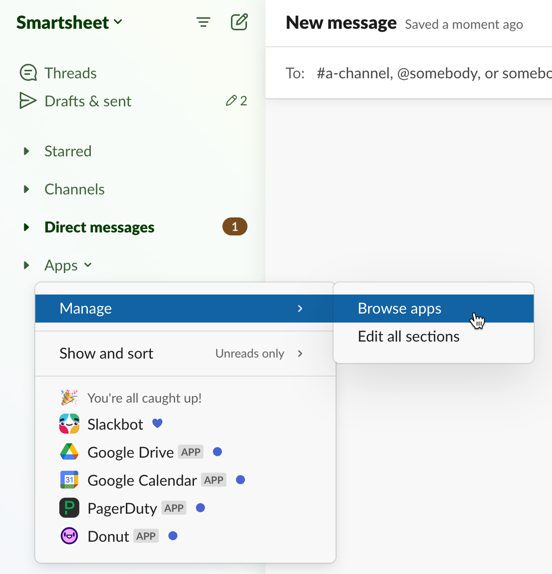
- In the search bar at the top, type Smartsheet, and select it from the results.
- Under Smartsheet, you have one of the following options:
- Open: The integration is already installed and is ready for use. Select Open. You land in the Smartsheet bot, where you can connect your account.
- Add: Your administrator has approved the integration, but you haven’t installed it yet. Select Add and follow the prompts to connect your account.
- A message indicating you are not authorized to use the integration. Your administrator has to approve the integration for you to install it.
Once you see the success page and the bot sends you the message You’re all set up!, you can directly access update requests, approval requests, notifications, and reminders from Smartsheet.
See how to receive alerts and requests in Slack.
Existing alerts and actions now go to Slack (in addition to the Notification Center and email inbox), but you can configure your notifications from Smartsheet.
Type help in a direct message to the bot to learn more.
Reauthenticate your Smartsheet integration
To reauthenticate with Slack:
- Open the Slack Market Place.
- Select Add to Slack.
- On the Permissions page, select Allow. This takes you back to the Slack Marketplace page.
- Navigate to the Slack bot and enter Hello to begin using.
Now you start receiving Smartsheet notifications as direct messages.