For Enterprise plans, table view allows users to create large-scale sheets that support up to 1,000,000 cells with up to 100,000 rows or 400 columns.
USM Content
Feel free to switch views at any time. Switching to table view from any other view doesn’t change data, ensuring consistency across all views.
All customers can access table view, but large-scale sheets (greater than 500,000 cells or 20,000 rows) are available to Enterprise plans only.
Table view can support even larger sheets than grid view. However, large-scale sheets aren't automatically activated in table view. For users of an Enterprise plan, you must explicitly opt-in each sheet you wish to use beyond 500,000 cells because not all Smartsheet capabilities are supported at this level of scale at this time.
| View | Rows | Columns | Cells |
|---|---|---|---|
| Grid | 20,000 | 400 | 500,000 |
| Table (large-scale sheets) | 100,000 | 400 | 1,000,000 |
If you're interested in large-scale sheets, you can either
- Join the Smartsheet Early Adopter Program to opt-in directly.
or
- Reach out to your Customer Success Manager, Technical Account Manager, or Account Executive to learn more
You must be an Admin on the sheet, and the sheet must belong to your company’s Smartsheet plan.
Supported features of large-scale sheets
The following features are compatible with large-scale sheets:
- Table view
- Conversations
- Attachments
- Data Shuttle
- DataTable
- Proofs/file reviews
- Dynamic View
- Conversation and sharing notifications
- Smartsheet Control Center intake sheets
- Smartsheet Webhooks
Forms submission
Unsupported features of large-scale sheets
Table view is newly released and continues to evolve. We're actively improving it, so stay tuned for updates and enhancements .
The following features aren't yet compatible with sheets with more than 20,000 rows or 500,000 cells of data:
- Grid
- Automated workflows
- Bridge workflows
- Salesforce and Jira connectors
- DataMesh
- Data Table
- Reports
- Form creation and editing.
- Mobile apps
- Open Database Connector
- Pivot
- Provisioning by portfolio management (Smartsheet Control Center)
- Resource Management
- Search
- Work insights
- Public API
- Import data from XLS, XLSX, CSV, Google sheet, MS Project, or Trello files.
View sheet size details
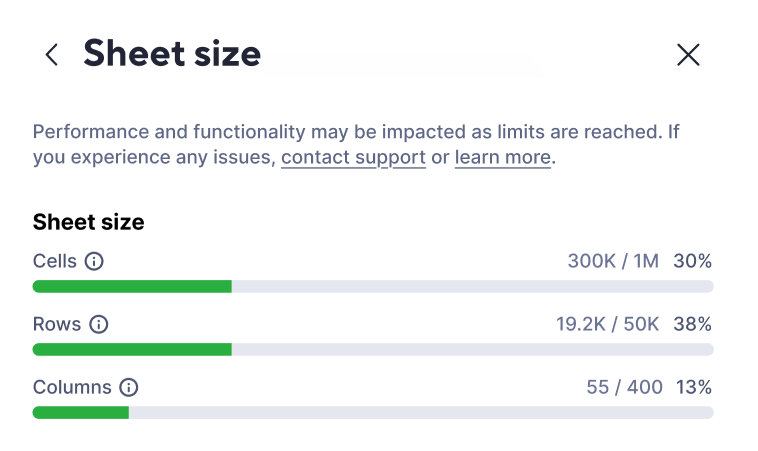
The sheet size window shows current sheet metrics like the number of cells, rows, and columns, respective to sheet capacity limits.
You can hit capacity limits in any of the three counts (cells, rows, or columns), since these are independently calculated.
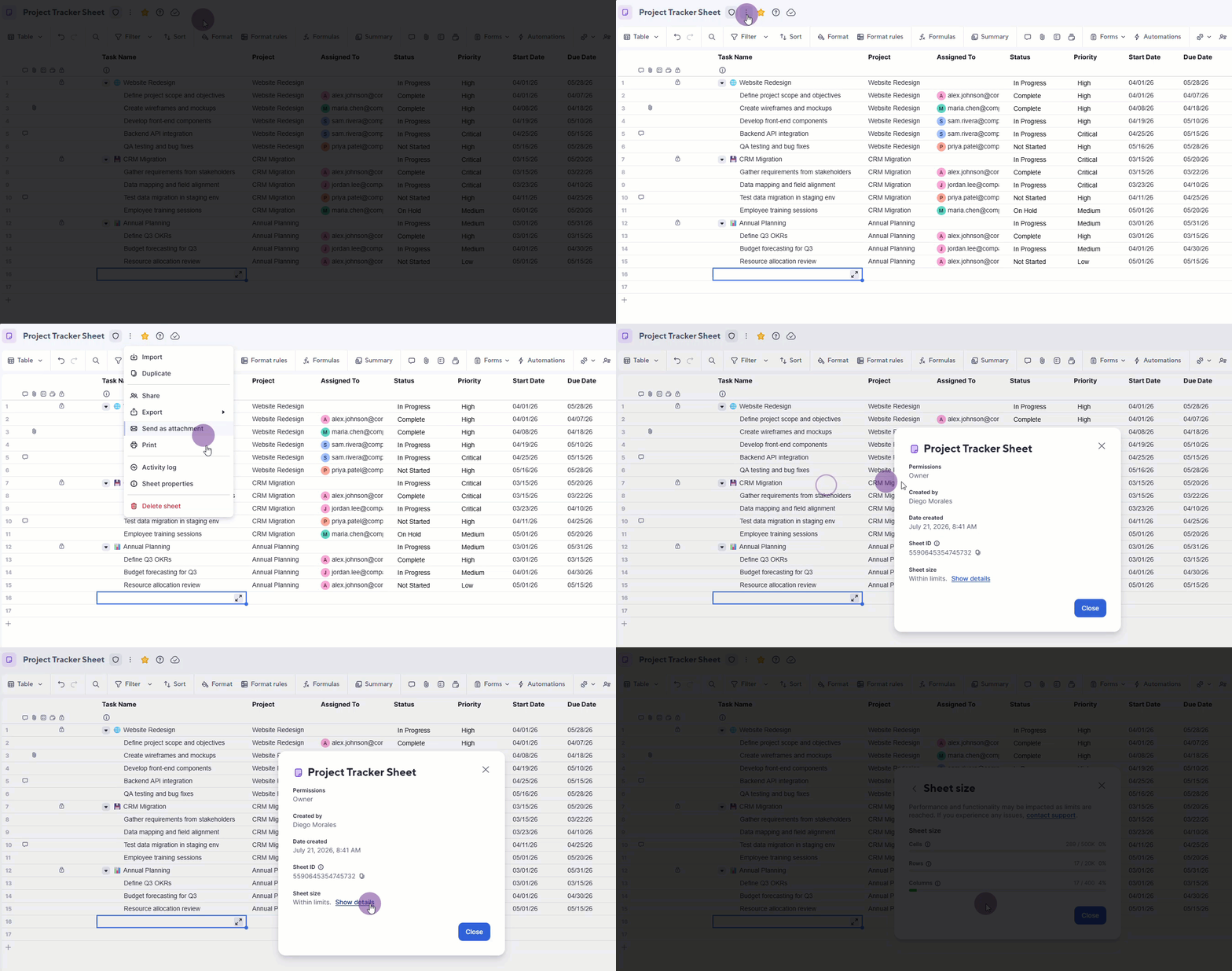
- Open your sheet in Table View.
- Select File menu
 next to the sheet title.
 - Select Sheet properties. The Sheet size section is displayed at the bottom of the properties menu.
- Select the Show details text to see the details window.
The Sheet size window is displayed.
How to reduce sheet size
When nearing sheet capacity limits, we recommend the following to ensure your sheets and solutions run smoothly without issues:
- Plan your sheet structure: Organize sheets by time horizons (one sheet per year, quarter, etc.) or split data by type. Each sheet gets its own capacity limits.
- Archive old data: Move completed or outdated rows to a separate archive sheet. Use automations to flag rows based on criteria like status or date to move them automatically.
- Remove blank rows: Delete any unused rows that accumulate across your sheet. These count against your limit even if they’re empty.
Refer to best practices for data collection and optimizing sheet load times for more recommendations.