Applies to
Resource Management
Capabilities
Who can use this capability
Resourcing Administrators, Portfolio Editors, People Schedulers, Project Editors, Portfolio Reporters, and Portfolio Viewers can create saved views and filter the Project portfolio.
Create a saved view of the project portfolio
You can filter your portfolio and save the view so you're only looking at the projects you want to see.
To create a saved view:
- On the top main navigation bar, click Projects.
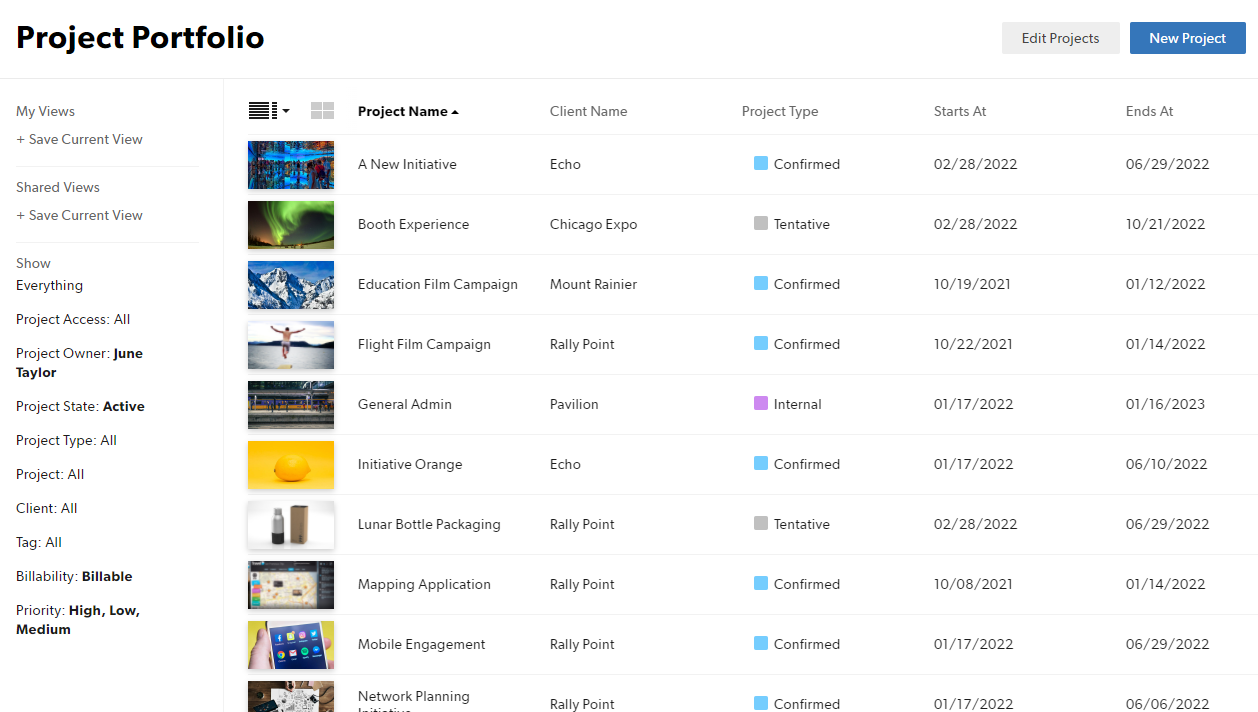
- On the left sidebar under Show, apply the filters you want to use.
- The screenshot below uses project custom fields as filters: Billability, Priority, and Project Owner.
- On the left sidebar under My Views or Shared Views, click + Save Current View.
- Only you can see reports saved under My Views.
- Anyone with access to the Projects portfolio page can see reports saved under Shared Views.
Brandfolder Image