Applies to
Date/Time Reference Guide
Date/Time Object
This article describes the data returned by most of the Date/Time modules.
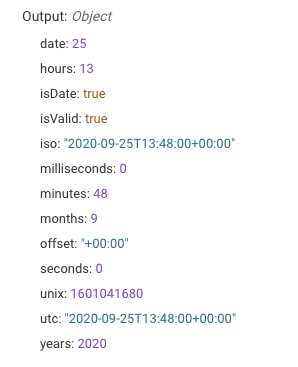
This JSON structure consists of properties representing a single moment in time. Below is an example of the structure. Most properties are self-explanatory but for clarification see the table below.
| Property | Type | Description |
|---|---|---|
| years | Number | Year of the specified date. |
| months | Number | Month of the year on the specified date. January equals 1. |
| date | Number | Date of the month in the specific date. |
| hours | Number | Hours in the day of a specific date or time. |
| minutes | Number | Minutes in the hour of a specific date or time. |
| seconds | Number | Seconds in the minute of a specific date or time. |
| milliseconds | Number | Milliseconds in the second of a specific date or time. |
| offset | String | Offset from the Coordinated Universal Time (UTC) in a ±HH:mm formatted string. |
| iso | String | Date/time in a ISO-8601 standard formatted string. E.g. YYYY-MM-DDTHH:mm:ssZ |
| utc | String | Date/time in UTC in ISO-8601 standard formatted string. |
| unix | Number | Unix timestamp of the Date/Time. |
| isValid | Boolean | Indicates whether or not the date/time is valid. |
If a Date/Time object fails, then an invalid Date/Time object is returned, for example:
{
"isValid": false
}
Duration Object
This article describes the data returned by the Compare Date/Time Module.
This JSON structure consists of properties representing a duration between two moments in time. Below is an example of the structure. Most properties are self-explanatory but for clarification see the table below.
{
"years": 2,
"months": 2,
"days": 2,
"hours": 2,
"minutes": 2,
"seconds": 2,
"milliseconds": 0,
"iso": 'PT19058H2M2S',
"humanized": '2 years',
"isDuration": true,
"isValid": true,
"in": {
"years": 2,
"months": 26,
"weeks": 113,
"days": 794,
"hours": 19058,
"minutes": 1143482,
"seconds": 68608922,
"milliseconds": 68608922000
}
}
| Property | Type | Description |
|---|---|---|
| years | Number | Years passed between the two dates. |
| months | Number | Months passed after calculating the number of years between the two dates. |
| days | Number | Days passed after calculating the number of months and years between the two dates. |
| hours | Number | Hours passed after calculating the number of days, months, and years between the two dates. |
| minutes | Number | Minutes passed after calculating the number of hours, days, months, and years between the two dates. |
| seconds | Number | Seconds passed after calculating the number of minutes, hours, days, months, and years between the two dates. |
| milliseconds | Number | Milliseconds passed after calculating the number of seconds, minutes, hours, days, months, and years between the two dates. |
| iso | String | Duration in a ISO-8601 standard formatted string. |
| humanized | String | Human readable format for the time. Similar response to the Format Date/Time Module with relative formatting. E.g. '2 years'. |
| isDuration | Boolean | Indicates if this is a duration object or not. This is always true if the object is valid. |
| isValid | Boolean | Indicates whether or not the date/time is valid. |
| in | Object | Each value in this object is similar to the property in this table but ignores all other units of time. E.g. Exactly 2 years between two dates are 24 months. |
If a Date/Time object fails for whatever reason (e.g. can't parse input correctly), then an invalid Date/Time object is returned. This looks like the following:
{
"isValid": false
}
Format Date/Time Tokens
Format Date/Time tokens can be used to represent a certain section of a date within a string. A string containing these tokens can also contain non-token characters as well E.g. '11th of March, 1952' can be represented as 'Do of MMMM, YYYY'.
| Token | Output | |
|---|---|---|
| Month | M | 1 2 ... 11 12 |
| Mo | 1st 2nd ... 11th 12th | |
| MM | 01 02 ... 11 12 | |
| MMM | Jan Feb ... Nov Dec | |
| MMMM | January February ... November December | |
| Quarter | Q | 1 2 3 4 |
| Qo | 1st 2nd 3rd 4th | |
| Day of Month | D | 1 2 ... 30 31 |
| Do | 1st 2nd ... 30th 31st | |
| DD | 01 02 ... 30 31 | |
| Day of Year | DDD | 1 2 ... 364 365 |
| DDDo | 1st 2nd ... 364th 365th | |
| DDDD | 001 002 ... 364 365 | |
| Day of Week | d | 0 1 ... 5 6 |
| do | 0th 1st ... 5th 6th | |
| dd | Su Mo ... Fr Sa | |
| ddd | Sun Mon ... Fri Sat | |
| dddd | Sunday Monday ... Friday Saturday | |
| Day of Week (Locale) | e | 0 1 ... 5 6 |
| Day of Week (ISO) | E | 1 2 ... 6 7 |
| Week of Year | w | 1 2 ... 52 53 |
| wo | 1st 2nd ... 52nd 53rd | |
| ww | 01 02 ... 52 53 | |
| Week of Year (ISO) | W | 1 2 ... 52 53 |
| Wo | 1st 2nd ... 52nd 53rd | |
| WW | 01 02 ... 52 53 | |
| Year | YY | 70 71 ... 29 30 |
| YYYY | 1970 1971 ... 2029 2030 | |
| Y | 1970 1971 ... 9999 +10000 +10001 Note: This complies with the ISO 8601 standard for dates past the year 9999 | |
| Week Year | gg | 70 71 ... 29 30 |
| gggg | 1970 1971 ... 2029 2030 | |
| Week Year (ISO) | GG | 70 71 ... 29 30 |
| GGGG | 1970 1971 ... 2029 2030 | |
| AM/PM | A | AM PM |
| a | am pm | |
| Hour | H | 0 1 ... 22 23 |
| HH | 00 01 ... 22 23 | |
| h | 1 2 ... 11 12 | |
| hh | 01 02 ... 11 12 | |
| k | 1 2 ... 23 24 | |
| kk | 01 02 ... 23 24 | |
| Minute | m | 0 1 ... 58 59 |
| mm | 00 01 ... 58 59 | |
| Second | s | 0 1 ... 58 59 |
| ss | 00 01 ... 58 59 | |
| Fractional Second | S | 0 1 ... 8 9 |
| SS | 00 01 ... 98 99 | |
| SSS | 000 001 ... 998 999 | |
| SSSS ... SSSSSSSSS | 000[0..] 001[0..] ... 998[0..] 999[0..] | |
| Time Zone | z or zz | EST CST ... MST PST |
| Z | -07:00 -06:00 ... +06:00 +07:00 | |
| ZZ | -0700 -0600 ... +0600 +0700 | |
| Unix Timestamp | X | 1360013296 |
| Unix Millisecond Timestamp | x | 1360013296123 |
Check Date/Time Module
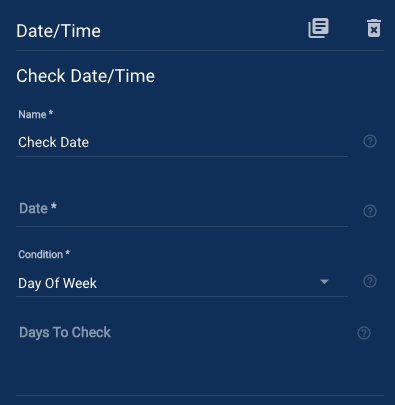
The Check Date/Time module checks an input date against specified conditions and routes the workflow accordingly.
The simplest way to use this is to reference the whole Date/Time Object.
Check Date/Time Fields
- Date: A required input to be checked against. The input can be an ISO-8601 formatted string, Unix Timestamp, or the structured Date/Time Object output of another Date/Time module.
- Condition: Specify the conditional operation to check against input date. You can choose from the following:
- Day of Week: Routes the workflow down the Success path if the date matches one of the selected days.
- Is Before another Date: Routes the workflow down the Success path if the date is before (or the same as) a supplied reference date.
- Is After another Date: Routes the workflow down the Success path if the date is after (or the same as) a supplied reference date.
- Is Between two Dates: Routes the workflow down the Success path if the date is before (or the same as) and after (or the same as) two supplied reference dates.
- Is a Leap Year: Routes the workflow down the Success path if the date is a leap year. Will route the workflow down the Failed path if the date isn't in a leap year or if the date doesn't contain a year e.g. if only the month was entered or referenced.
Reference Dates
If you choose to check if a date is before, after, or between one or more reference dates then these inputs are required. These inputs can be an ISO-8601 formatted string, Unix Timestamp, or the structured Date/Time Object output of another Date/Time module.
Inclusive Reference Dates
When using reference dates, the dates are considered exclusive by default (E.g. Is Before and not the same as). Setting this parameter to true will calculate the condition based on inclusive reference dates (E.g. Is Before or same as).
Compare Date/Time Module
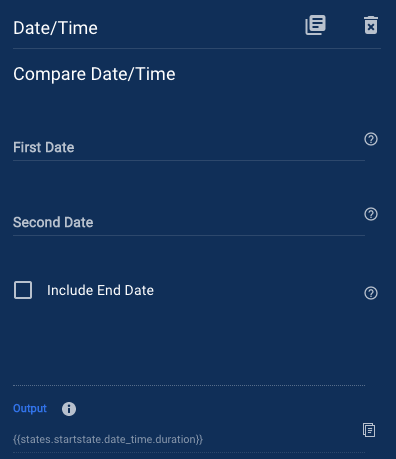
The Compare Date/Time module compares two Date/Time objects resulting in the absolute difference between them.
Compare Date/Time Fields
- First Date: A required input date to compare. The input can be an ISO-8601 formatted string, Unix Timestamp, or the structured Date/Time Object output of another Date/Time module.
- Second Date: A required input date to be compared to. The input can be an ISO-8601 formatted string, Unix Timestamp, or the structured Date/Time Object output of another Date/Time module.
- Include End Date: If selected, the second input date is included in the calculation. E.g. Monday to Friday would be 5 days instead of 4.
Compare Date/Time Returns
If the module is successful, it returns a structured Duration Object.
Current Date/Time Module
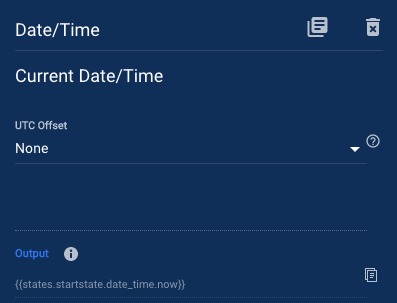
The Current Date/Time module returns the current moment in time as a structured Date/Time Object that can be manipulated or formatted.
Current Date/Time Fields
- Offset: How to define the UTC offset for the input. Hourly offsets from -12:00 hours to +12:00 hours can be set or you can have greater control over the UTC Offset with the following options.
- None: The input is parsed as is. If there is no offset defined in the input string then no offset will be applied. If you are parsing a string that includes an offset (for example an ISO-8601 formatted string) then the offset will be set to the same as the string's offset. E.g. 2017-07-02T21:30:00-07:00 will have an offset of -07:00 hours.
- Timezone Offset: Choose a timezone to calculate the UTC offset from. This calculation accounts for any daylight savings that may occur in certain time zones on certain dates.
- Lat/Long Offset: Specify a location from a latitude and longitude string separated by a comma (,). Daylight savings are included in offset calculation. E.g. 47.650499,-122.350070 would be America/Los_Angeles and calculate to -08:00 in the winter and -07:00 in the summer.
- Custom Offset: Define a custom offset in the format of ±HH:mm. E.g. Plus eight and a half hours: +08:30
Current Date/Time Returned Data
If the input string is parsed successfully then the module returns a structured Date/Time Object.
Format Date/Time Module
The Format Date/Time module will format a structured Date/Time Object to any user defined string.
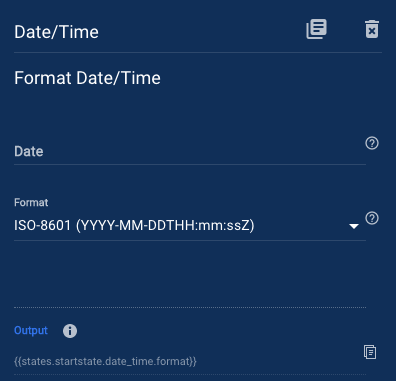
Format Date/Time Fields
- Date: A required input to be formatted into a string. The input can be an ISO-8601 formatted string, Unix Timestamp, or the structured Date/Time Object output of another Date/Time module.
- Format: The format of the returned output. Choose from one of the common options, use Date/Time tokens to create a custom format, or specify another Date/Time object for a relative format.
Format Date/Time Returned Data
The following formats will be shown with an example date of 11th of March 1952 at 8.15am.
ISO-8601
Output the format in the standard ISO-8601 date time format (YYYY-MM-DDTHH:mm:ssZ) – 1952-03-11T08:15:00+00:00
YYYY-MM-DD
1952-03-11
MM/DD/YYYY
03/11/1952
DD/MM/YYYY
11/03/1952
MM/DD
03/11
DD/MM
11/03
HH:mm
08:15
HH:mm:ss
08:15:00
Customized Format
Use Date/Time Format Tokens to create a custom format string. Non token characters are also allowed to create a string E.g. Do of MMMM, YYYY – 11th of March, 1952
Relative Format
Supply another Date/Time object to relatively format the input. The unit of time is rounded down to the largest unit of change E.g. Supply a 'ISO-8601' standard date/time string of 1952-03-13T09:15:00+00:00 and the output will be '2 days ago` instead of '2 days, and 23 hours ago'. This is a simple way to get humanized formats, if you need more granularity see Compare Date/Time Module and the resulting Duration Object.
Manipulate Date/Time Module
The Manipulate Date/Time module can manipulate a structured Date/Time Object by adding, subtracting, or setting units of time.
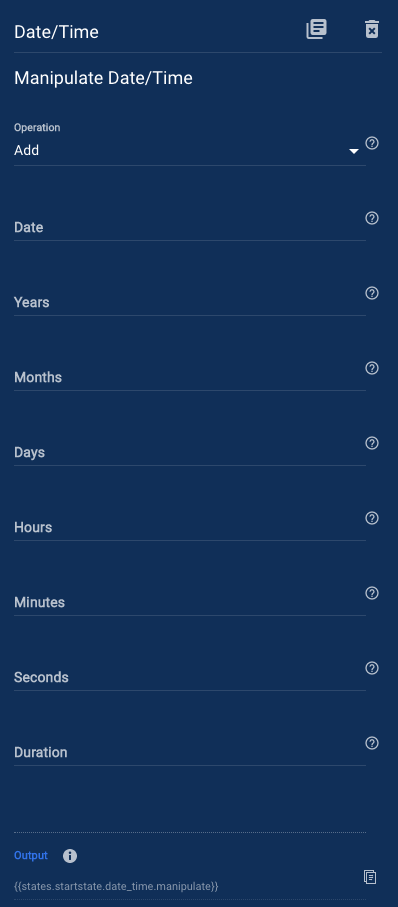
Manipulate Date/Time Fields
- Operation: Manipulate the input date by choosing to adding, subtracting, or set units of time.
- Date: A required input to be manipulated. The input can be an ISO-8601 formatted string, Unix Timestamp, or the structured Date/Time Object output of another Date/Time module.
- Years: Years to add or subtract from the input date. If using operation, Set, then sets the year (e.g. 1952).
- Months: Months to add or subtract from the input date. If using operation, Set, then sets the month (1 - 12).
- Days: Days to add or subtract from the input date. If using operation, Set, then sets the date of the month.
- Hours: Hours to add or subtract from the input date. If using the operation, Set, then set the hour (0 - 23).
- Minutes: Minutes to add or subtract from the input date. If using operation, Set, then sets the minute (0 - 59).
- Seconds: Seconds to add or subtract from the input date. If using operation, Set, then sets the second (0 - 59).
- Duration: Add or subtract a duration. This is represented as a standard ISO-8601 duration string or a Duration Object from the output of the Compare Date/Time Module.
Manipulate Date/Time Returns
If the input string is parsed successfully then the module returns a structured Date/Time Object.
Parse Date/Time Module
The Parse Date/Time module will parse a date into a structured Date/Time Object that can be manipulated or formatted.
Along with human readable dates, this module can parse ISO-8601 standard strings, RFC 2822 standard strings, Unix timestamps, or the output of another Parse Date/Time module. If the input is invalid then an Invalid Date/Time object will be returned.
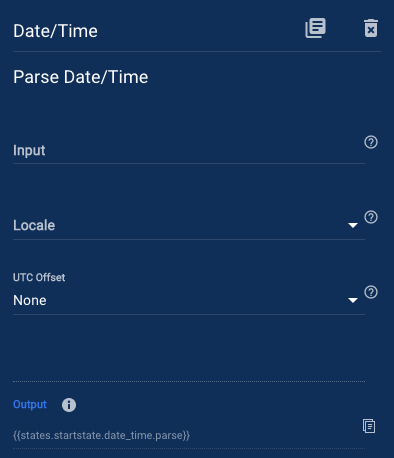
Parse Date/Time Fields
- Date: A required input to be parsed into a structured Date/Time object. The input can be in any human readable string, ISO-8601, RFC 2822, Unix Timestamp, or the output of another Parse Date/Time module.
- Locale: An optional input for supplying the locale of the input. The locale is used to differ between common patterns e.g. April 5th, 2017 can be 04/05/2017 in USA locale or 05/04/2017 in UK locale. These patterns are extremely difficult to distinguish between and so it is recommended that you specify the appropriate locale to suit your needs. The default is American format (en).
- UTC Offset: How to define the UTC offset for the input. Hourly offsets from -12:00 hours to +12:00 hours can be set or you can have greater control over the UTC Offset with the following options.
- None: The input will be parsed as is. If there is no offset defined in the input string then no offset is applied. If you are parsing a string that includes an offset (for example an 'ISO-8601' formatted string) then the offset is set to the same as the string's offset. E.g. 2017-07-02T21:30:00-07:00 will have an offset of -07:00 hours.
- Timezone Offset: Choose a timezone to calculate the UTC offset from. This calculation accounts for any daylight savings that may occur in certain time zones on certain dates.
- Lat/Long Offset: Specify a location from a latitude and longitude string separated by a comma (,). Daylight savings are included in offset calculation. E.g. 47.650499,-122.350070 would be America/Los_Angeles and calculate to -08:00 in the winter and -07:00 in the summer.
- Custom Offset: Define a custom offset in the format of ±HH:mm. E.g. Plus eight and a half hours: +08:30
Parse Date/Time Returns
If the input string is parsed successfully then the module returns a structured Date/Time Object.
Round Date/Time Module
The Round Date/Time module returns the start or end of a specified unit of time of a given structured Date/Time Object.
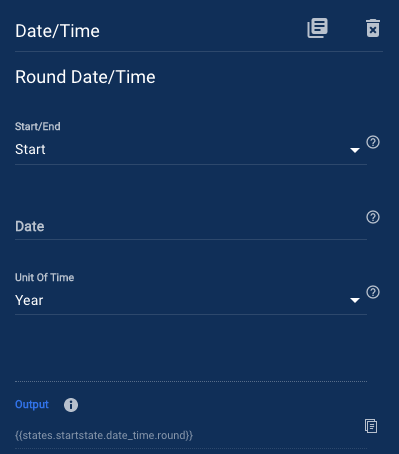
Round Date/Time Fields
- Start/End: Round the input to the start or end of the time unit specified.
- Start: Round to the start of a unit of time. E.g. 8.15am will become 8.00am
- End: Round to the end of a unit of time. E.g. 8.15am will become 8.59am
- Date: A required input to be rounded up or down by the specified unit. The input can be an ISO-8601 formatted string, Unix Timestamp, or the structured Date/Time Object output of another Date/Time module.
- Unit of Time: The unit of time in which you wish to round up or down to. You can choose from the following:
- Year
- Quarter
- Month
- Week
- Day
- Hour
- Minute
First Day of Week
The first day of the week may differ around the world so when the unit of time selected is week, this option allows you to set what day is considered the start of the week.
Round Date/Time Returns
If the input string is parsed successfully then the module returns a structured Date/Time Object.