Применить к
- Pro
- Business
- Enterprise
Возможности
Кому доступна эта возможность?
Владелец и администраторы таблицы могут создавать напоминания на уровне строки и указывать любого получателя.
Редакторы и наблюдатели могут создавать напоминания на уровне строки для самих себя. Они не могут указывать других получателей.
Получение напоминаний об определённых задачах
Напоминания на уровне строки позволяют оповещать пользователей (в том числе себя) об определённых задачах в таблице. Например, вы можете установить напоминание о предположительной дате начала определённой задачи, чтобы следить за выполнением проекта.
Создание напоминаний на уровне строки
Чтобы настроить напоминание на уровне строки, выполните указанные ниже действия.
-
Нажмите значок колокольчика
в столбце индикаторов действий для соответствующей строки. Если вы раньше не создавали напоминаний, щёлкните правой кнопкой мыши номер строки и выберите Настроить напоминание... в контекстном меню.
Появится окно Новое напоминание.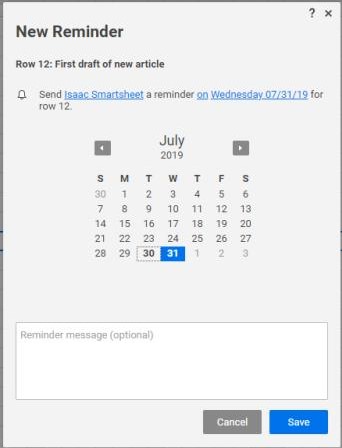
-
Нажмите кнопку Сохранить.
Вы создали напоминание на уровне строки, чтобы получать оповещения об этой задаче. В строке с напоминанием будет отображаться значок колокольчика 
Дополнительные возможности напоминаний
Чтобы внести изменения в существующие напоминания, нажмите значок колокольчика для соответствующей строки. Появится окно Напоминания.
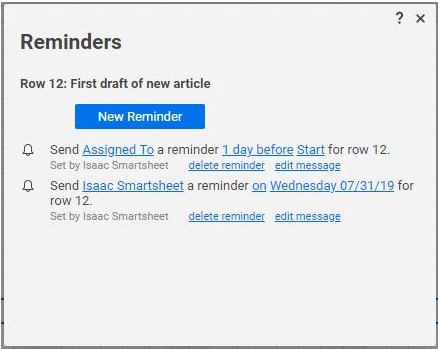
В окне Напоминания можно удалять и редактировать напоминания:
-
Получатель: выберите контакт или имя столбца, связанное с получателем.
-
Время: настройте отправку напоминания до, в указанную дату или после неё.
-
Триггер даты: нажмите кнопку даты, чтобы изменить конкретную дату или столбец дат, который используется для запуска напоминания.
-
Пользовательское сообщение: выберите Изменить сообщение, чтобы изменить текст напоминания.