Find answers to common questions about using portfolios in Smartsheet.
How do I view project details?
Select a project row in the project list to open the Details panel on the right. The panel displays the project name, template, workspace status, and other column data. You can edit project information directly from this panel.
You can also switch to table view to see all columns and project data at once.
How do I select projects?
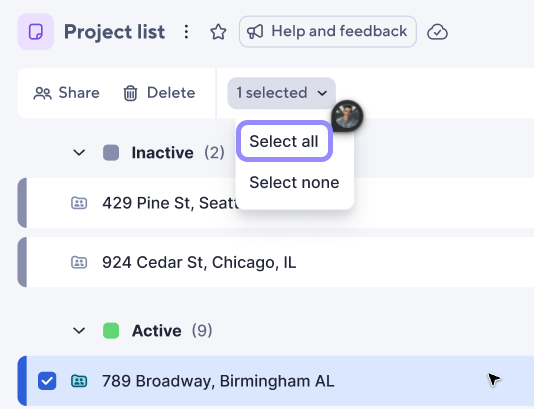
Select a project by selecting its row in the project list. To select multiple projects, check the box next to each project name.
To select all projects at once, select one project, then go to the top toolbar and use the dropdown to select Select all.
How do I switch between views on the project list?
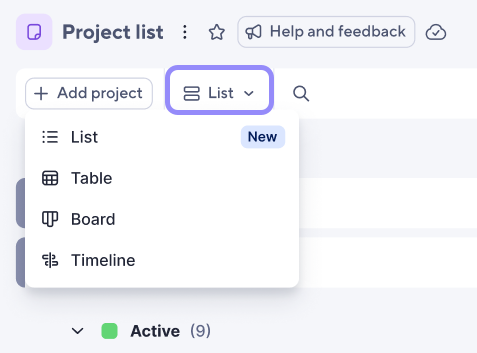
The project list supports two views: list view and table view. Use the view switcher in the toolbar at the top of the project list to toggle between them.
List view gives you a streamlined way to manage your projects — activate, share, delete, and open projects directly from the project card. Table view shows all columns and project data in a more detailed layout.
Other views aren't available on the project list.
How do I open a project workspace?
There are several ways to open an active project workspace:
- Select the link in the Workspace status column of your project list.
- Select the Actions menu (three-dot icon) on the project row and select Open workspace.
- From the Portfolios tab on Home, expand your portfolio and select the project directly.
Once inside a project workspace, you can navigate back to the portfolio by selecting the portfolio name in the navigation path.
How do I activate a project that was requested through a form?
If your portfolio uses a form for project intake, submitted requests appear as inactive projects in the project list. To activate a requested project:
- Open your portfolio and find the requested project in the Inactive group.
- Review the project details in the Details panel to confirm the information.
- Select Activate from the Details panel or directly from the project card in list view.
The project provisions a new workspace just like any other activated project.
Learn more about how to create and activate a project in a portfolio.
How do I search for a project in my portfolio?
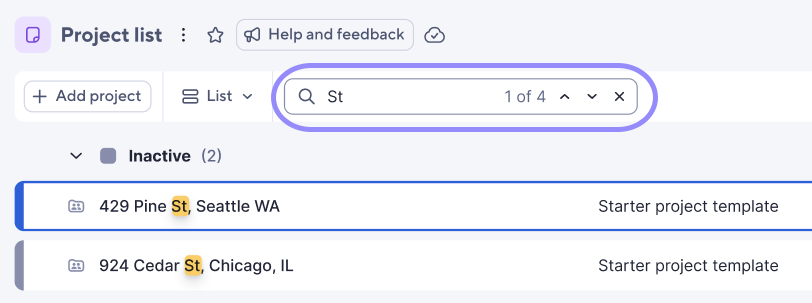
Select the search icon in the toolbar at the top of the project list to search for projects by name.
What can I do with my permission level?
The following table shows you which tasks each permission level allows you to perform.
Actions | Portfolio Owner | Portfolio Admin | Portfolio Editor-can share | Portfolio Editor-cannot share | Portfolio Commenter | Portfolio Viewer |
|---|---|---|---|---|---|---|
Provision new projects | ✅ | ✅ | ✅ | ✅ | ⛔ | ⛔ |
Delete projects | ✅ | ✅ | ⛔ | ⛔ | ⛔ | ⛔ |
Delete Portfolio | ✅ | ⛔ | ⛔ | ⛔ | ⛔ | ⛔ |
Share Portfolio | ✅ | ✅ | ✅ | ⛔ | ⛔ | ⛔ |
Transfer Portfolio | ⛔ | ⛔ | ⛔ | ⛔ | ⛔ | ⛔ |
Create an item in Portfolio (Dashboard, report, sheet, folder, collection, etc) | ✅ | ✅ | ⛔ | ⛔ | ⛔ | ⛔ |
Create templates | ✅ | ✅ | ⛔ | ⛔ | ⛔ | ⛔ |
Delete template | ✅ | ✅ | ⛔ | ⛔ | ⛔ | ⛔ |
Edit template | ✅ | ✅ | ✅ | ✅ | ⛔ | ⛔ |
Save existing workspace as template | ✅ | ✅ | ⛔ | ⛔ | ⛔ | ⛔ |
View projects | ✅ | ✅ | ✅ | ✅ | ✅ | ✅ |
Share projects | ✅ | ✅ | ✅ | ⛔ | ⛔ | ⛔ |
What happens to the items inside a project workspace when I activate it?
Each activated project creates a new workspace. The workspace inherits the project name, and individual items within the workspace use the [Item name] - [Project name] naming convention.
Can I use column links in my portfolio templates?
Yes. Column links within template items replicate when you provision new projects. If your template includes column links between items, those links carry over to each new project workspace.
Does the intake sheet data connect to my project workspaces?
Not for basic portfolios. Data in the project list (intake sheet) doesn't automatically flow into provisioned project workspaces.
If you need to reference intake data within your projects, you can use cell linking or manage a separate sheet as a workaround.
Advanced Portfolios offers the option to roll up sheet data into a summary sheet. Learn more about how to use a portfolio summary and how to create linked summary fields.
Can I use portfolios with Resource Management, Dynamic View, or data integrations?
Resource Management, Dynamic View, and data integrations don't currently work with portfolios.
Can I create a portfolio on the Smartsheet AU domain?
Portfolios aren't available on the AU domain at launch.
What are the differences between portfolios and Control Center?
Portfolios offer a lightweight, self-serve way to standardize and manage project work. Control Center is designed for larger-scale programs that require advanced governance, global updates, and metadata management.
Portfolios don't replace Control Center. They serve teams and departments with simpler standardization needs.
Why can't I see the project list?
If your organization has MFA enabled and you share a project with a user on a plan without MFA, that user can’t access the portfolio's project list. They can still access individual project items shared directly with them.