Applies to
Capabilities
Who can use this capability
Resourcing Administrators, Portfolio Editors, People Schedulers, and Project Editors can manage project bill rates.
Edit project bill rates
Bill rates are the hourly rates charged for work performed.
New projects use your organization’s default bill rate matrix from account settings. When tracking fees for a project, you will need to multiply the incurred hours times the bill rate, and the output is the incurred fees for the project (incurred hours x the bill rate = incurred fees for a project).
To use bill rates, first create a default bill rate matrix in account settings.
If you have custom rates for a project or client, you can edit bill rates in project settings so they apply only to that project. Changes to the default matrix will not affect bill rates set in project settings.
Default bill rates
To create a default bill rate matrix:
- In the top right corner, select Settings and then select Account Settings.
- On the left sidebar, select Bill Rates
- Add your roles, disciplines, rates, and people, and then select Save.
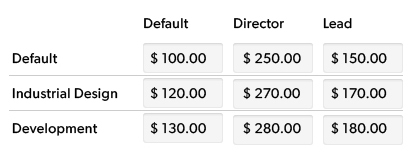
When you add a resource to a project, settings for that person determine their bill rate. Resources can have a custom bill rate or a bill rate tied to their Role or Discipline.
Custom bill rates
To view or edit bill rates for team members:
- Go to the project and, in the top right corner, select Project Settings.
- Scroll down to Bill Rates.
Varied bill rates
If resources have more than one rate for a project, you can set custom rates for each phase of the project. When the team member reports hours for that specific phase, Resource Management will assign the correct bill rate for the phase.
For example:
Tamika works as a Creative Director for $150/h. She also works as a Designer for $100/h on the same project. Set bill rates for each of Tamika's roles in Project Settings.
Then, create two phases for the project: Creative Direction and Design.
Now, assign Tamika to both phases. When Tamika enters time, or you make assignments on the schedule for either phase, appropriate rates apply.